Terrain
Flint’s terrain system provides heightmap-based outdoor environments via the flint-terrain crate. Rolling hills, mountains, valleys, and open landscapes are defined by a grayscale heightmap image and textured with up to four blended surface layers controlled by an RGBA splat map.
How It Works
A single terrain component on an entity defines the entire terrain surface:
Heightmap PNG          flint-terrain              flint-render
  grayscale    ──►  Chunked mesh generation  ──►  TerrainPipeline
  257x257           positions/normals/UVs          PBR lighting
                    triangle indices               splat-map blending
                                                   cascaded shadows

Splat Map PNG                                    flint-physics
  RGBA channels  ──►  4-layer texture blend      Rapier trimesh
  R=grass G=dirt       tiled from world pos       collision collider
  B=rock  A=sand
The heightmap is a grayscale PNG (8-bit or 16-bit) where black is the lowest point and white is the highest. The terrain is divided into chunks for efficient rendering — each chunk is an independent draw call with its own vertex and index buffers.
Adding Terrain to a Scene
Create an entity with the terrain archetype:
[entities.ground]
archetype = "terrain"

[entities.ground.transform]
position = [-128, 0, -128]

[entities.ground.terrain]
heightmap = "terrain/heightmap.png"
splat_map = "terrain/splatmap.png"
layer0_texture = "terrain/grass.png"
layer1_texture = "terrain/dirt.png"
layer2_texture = "terrain/rock.png"
layer3_texture = "terrain/sand.png"
width = 256.0
depth = 256.0
height_scale = 50.0
texture_tile = 16.0
The transform.position sets the world-space origin of the terrain. The heightmap is placed starting at that position, extending width units along X and depth units along Z. Heights range from 0 to height_scale units along Y.
Heightmap
The heightmap is a grayscale PNG image. Each pixel encodes a height value:
- 8-bit grayscale — 256 height levels
- 16-bit grayscale — 65,536 height levels (recommended for large terrains)
The heightmap resolution determines mesh detail. A 257x257 image with chunk_resolution = 64 produces a 4x4 grid of chunks, each with 65x65 vertices (16,641 vertices per chunk, 24,576 triangles per chunk).
Heights are sampled with bilinear interpolation for smooth surfaces, even with lower-resolution heightmaps.
Creating Heightmaps
Any image editor that outputs grayscale PNGs works. Common approaches:
- Photoshop/GIMP — paint or use noise filters, export as grayscale PNG
- World Machine / Gaea — procedural terrain generation tools
- Python + Pillow — generate programmatically with noise functions
- Real-world data — USGS elevation data converted to grayscale
The dimensions should ideally be (N * chunk_resolution) + 1 for clean chunk boundaries (e.g., 257, 513, 1025).
Splat Map
The splat map is an RGBA PNG that controls how four texture layers blend across the terrain surface:
| Channel | Layer | Typical Use |
|---|---|---|
| R (red) | Layer 0 | Grass |
| G (green) | Layer 1 | Dirt |
| B (blue) | Layer 2 | Rock |
| A (alpha) | Layer 3 | Sand |
At each pixel, the RGBA weights are normalized so they always sum to 1.0. A pixel with (255, 0, 0, 0) shows pure grass; (128, 128, 0, 0) shows a 50/50 grass-dirt blend.
If no splat map is provided, the terrain uses the default white texture uniformly.
Creating Splat Maps
Splat maps can be painted manually in any image editor that supports RGBA channels, or generated algorithmically based on height and slope:
- Low flat areas — grass (red channel)
- Mid elevations — dirt (green channel)
- Steep slopes / high peaks — rock (blue channel)
- Very low areas — sand (alpha channel)
Texture Tiling
Layer textures are tiled across the terrain surface based on world position, not the terrain UV. The texture_tile field controls how many times the texture repeats per 100 world units:
texture_tile | Repetitions per 100 units | Good for |
|---|---|---|
| 4.0 | 4x | Large rock formations |
| 12.0 | 12x | General ground cover |
| 24.0 | 24x | Fine detail (grass blades) |
Higher values produce finer detail but may show visible tiling at a distance. Future updates will add detail textures and triplanar mapping to mitigate this.
Component Schema
| Field | Type | Default | Description |
|---|---|---|---|
heightmap | string | Path to grayscale PNG (relative to scene directory) | |
width | f32 | 256.0 | World-space extent along X axis |
depth | f32 | 256.0 | World-space extent along Z axis |
height_scale | f32 | 50.0 | Maximum height in world units |
chunk_resolution | i32 | 64 | Vertices per chunk edge (higher = more detail) |
texture_tile | f32 | 16.0 | Texture tiling factor per 100 world units |
splat_map | string | “” | Path to RGBA splat map PNG |
layer0_texture | string | “” | Layer 0 texture (splat R channel) |
layer1_texture | string | “” | Layer 1 texture (splat G channel) |
layer2_texture | string | “” | Layer 2 texture (splat B channel) |
layer3_texture | string | “” | Layer 3 texture (splat A channel) |
metallic | f32 | 0.0 | PBR metallic value for terrain surface |
roughness | f32 | 0.85 | PBR roughness value for terrain surface |
Grass
Terrain can carry a GPU-instanced grass layer. Blades are scattered by a compute shader, drawn as crossed quads with wind sway and bend-on-contact, and cast into the two nearest shadow cascades. Nothing is authored by hand: density comes from the splat map, so grass grows exactly where the grass layer is painted.
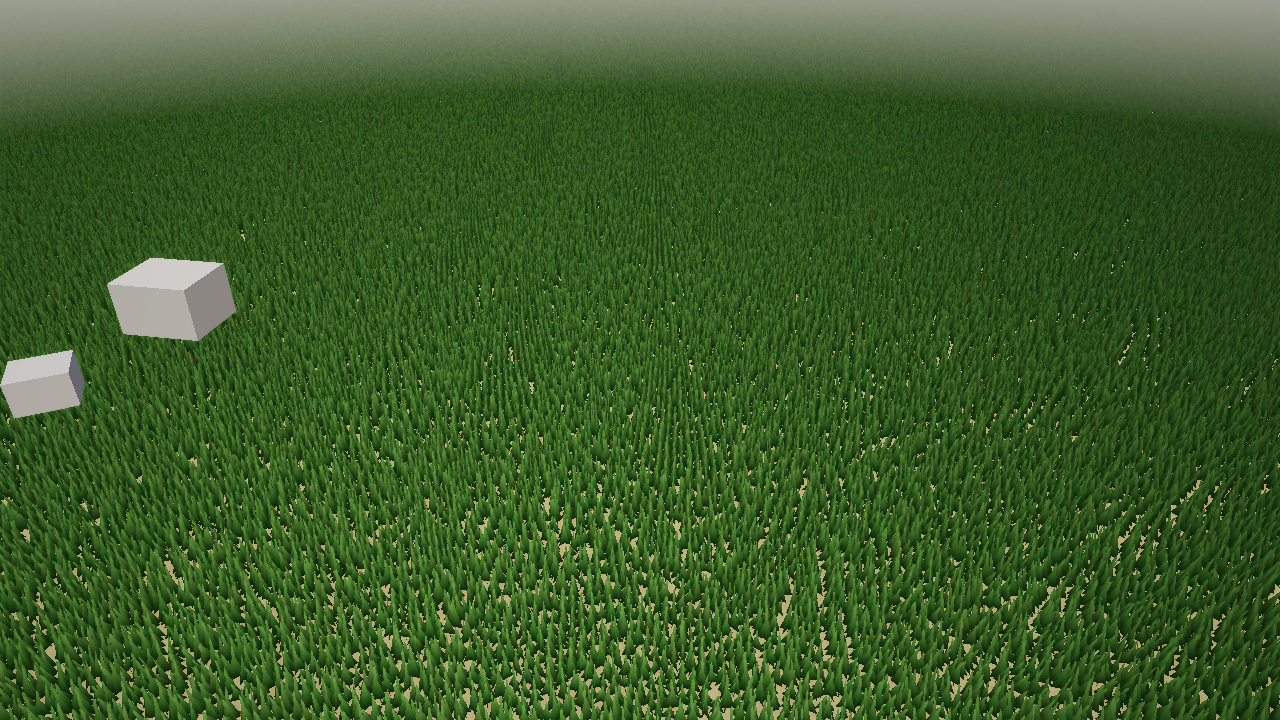
The Rolling Meadow demo: stylised grass driven by the splat map’s red channel, with golden-hour lighting.
Grass is a block of dotted keys on the same terrain component:
[entities.ground.terrain]
heightmap = "terrain/heightmap.png"
splat_map = "terrain/splatmap.png"
width = 384.0
depth = 384.0
"grass.enabled" = true
"grass.density" = 50.0
"grass.max_distance" = 100.0
"grass.fade_start" = 70.0
"grass.blade_height" = 0.43
"grass.color_base" = [0.12, 0.42, 0.08]
"grass.color_tip" = [0.35, 0.72, 0.18]
"grass.wind_direction" = [0.8, 0.0, 0.6]
"grass.wind_strength" = 0.09
| Field | Type | Default | Description |
|---|---|---|---|
grass.enabled | bool | false | Turn the grass layer on |
grass.density | f32 | 8.0 | Blades per square metre |
grass.max_distance | f32 | 80.0 | Distance from the camera at which grass stops |
grass.fade_start | f32 | 60.0 | Distance where probabilistic thinning begins |
grass.blade_width | f32 | 0.08 | Blade width in metres |
grass.blade_height | f32 | 0.4 | Base blade height in metres |
grass.height_variation | f32 | 0.3 | Random height scale, 0 to 1 |
grass.color_base | vec3 | [0.15, 0.45, 0.1] | Colour at the root, linear RGB |
grass.color_tip | vec3 | [0.3, 0.7, 0.15] | Colour at the tip |
grass.color_dry | vec3 | [0.55, 0.5, 0.2] | Dry tint mixed in per blade |
grass.dry_amount | f32 | 0.15 | How much of the field is dry, 0 to 1 |
grass.wind_direction | vec3 | [1.0, 0.0, 0.3] | Wind direction in the XZ plane |
grass.wind_speed | f32 | 1.0 | Sway frequency multiplier |
grass.wind_strength | f32 | 0.15 | Maximum sway displacement in metres |
grass.bend_radius | f32 | 2.0 | Radius around an entity within which blades bend away |
grass.bend_strength | f32 | 0.8 | How far they bend, 0 to 1 |
grass.density_source | string | “splat” | splat reads the splat map; map is reserved for a dedicated density texture |
grass.density_layer | i32 | 0 | Which splat channel drives density (0 = R, 1 = G, 2 = B, 3 = A) |
grass.density_threshold | f32 | 0.1 | Minimum splat weight before a blade may spawn |
How it works, per frame:
- A compute pass walks a grid whose spacing is
1 / sqrt(density), samples the splat map’sdensity_layerat each cell, skips cells underdensity_threshold, applies a probabilistic falloff betweenfade_startandmax_distance, and writes a 32-byte instance (position on the heightmap, rotation, height scale, packed tint) into a storage buffer. - A render pass draws one shared blade mesh per instance. The vertex shader sways blades by a time-driven wind term and pushes them away from up to eight entity positions within
bend_radius; the fragment shader blendscolor_basetocolor_tipalong the blade, mixes incolor_dry, and shades with the same lighting levers and PCSS shadows as other geometry. The player feeds the camera position as the bend entity. - The shadow pass renders the instances into the nearest two cascades, so grass darkens the ground under it.
The pipeline participates in MSAA when the player runs with --msaa 4, and grass appears in flint render snapshots at time zero, so the wind is frozen but the field is fully populated.
The Grass Debug panel (F3 in the player, see Debug Panels) exposes every field above live and can commit them back to the scene file, which is how the meadow demo’s numbers were found.
Physics Collision
Terrain automatically gets a trimesh physics collider via Rapier. The mesh geometry is exported as vertices and triangle indices, then registered as a fixed (immovable) rigid body. This means:
- Characters walk on the terrain surface naturally
- Objects collide with the terrain
- Raycasts hit the terrain for line-of-sight checks
The collider shape exactly matches the rendered mesh, so what you see is what you collide with.
Height Sampling from Scripts
The terrain_height(x, z) function is available in Rhai scripts to query the terrain height at any world position:
#![allow(unused)]
fn main() {
fn on_update() {
    let me = self_entity();
    let pos = get_position(me);

    // Get terrain height at entity's XZ position
    let ground_y = terrain_height(pos.x, pos.z);

    // Snap entity to terrain surface
    set_position(me, pos.x, ground_y + 0.5, pos.z);
}
}
This is useful for:
- NPC placement — keep characters on the ground
- Projectile impact — detect when a projectile hits terrain
- Camera clamping — prevent the camera from going below ground
- Vegetation scattering — place objects at correct heights
The function uses bilinear interpolation on the heightmap data, matching the rendered surface exactly. It returns 0.0 if no terrain is loaded.
Rendering
Terrain uses its own TerrainPipeline with full PBR lighting — the same Cook-Torrance BRDF, cascaded shadow maps, point lights, and spot lights as regular scene geometry. Terrain both casts and receives shadows.
The rendering order places terrain early in the pass (after the skybox, before entity geometry) to fill the depth buffer for efficient occlusion culling of objects behind hills.
When post-processing is active, the terrain outputs linear HDR values like all other scene geometry. The composite pass handles tonemapping, bloom, fog, and other effects.
Scene Transitions
Terrain is fully cleared and reloaded during scene transitions. When load_scene() is called:
- Current terrain draw calls and physics collider are removed
- New scene is loaded
- New terrain (if any) is generated, uploaded to GPU, and registered with physics
- The
terrain_height()callback is updated to use the new heightmap
Architecture
The terrain system is split across crates to maintain clean dependency boundaries:
flint-terrain— pure data crate (no GPU dependency). Generates chunked mesh geometry from heightmap data. Outputs raw positions, normals, UVs, and indices.flint-render—TerrainPipelineandterrain_shader.wgsl. Assembles GPU vertex buffers from terrain data, handles splat-map texture blending and PBR lighting.GrassPipelinewithgrass_compute.wgslandgrass_render.wgslowns the grass layer;flint-terrainonly holds itsGrassConfig.flint-physics— reuses existingregister_static_trimesh()for collision. No terrain-specific physics code needed.flint-script—terrain_height(x, z)Rhai function via callback pattern.
This separation means flint-terrain can be used independently for tools, CLI commands, or headless processing without pulling in the GPU stack.
Limitations
- One terrain per scene — currently only the first terrain entity is loaded
- No mesh LOD — all chunks render at full resolution regardless of distance (chunks outside the camera frustum are culled; grass thins with distance)
- No runtime deformation — terrain is static after loading
- CPU-side simulation — no GPU compute for terrain generation
- Fixed PBR parameters — metallic and roughness are uniform across the entire terrain surface
See the Terrain Roadmap for planned features including LOD, sculpting, auto-splatting, triplanar mapping, and more.
Further Reading
- Rendering — the PBR pipeline that terrain builds on
- Post-Processing — bloom, fog, and SSAO that apply to terrain
- Physics and Runtime — the collision system terrain integrates with
- Scripting —
terrain_height()and other script APIs - Schemas — component and archetype definitions