Compressor
Module ID fx.compressor · Category Effect
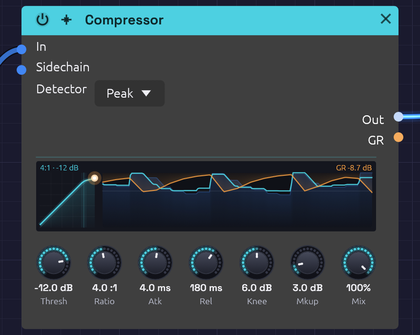 A kick on every beat over a low saw: each hit climbs the curve, and the reduction it brings hangs over the sound coming in
The Compressor turns down a signal when it gets loud and leaves it alone when it's quiet. That evens out the level of a bass line, adds snap to percussion, holds a pad steady, or, with a kick in the Sidechain input, makes a pad pump in time.
It also puts its gain reduction out as a control signal on GR, so the amount of compression can move other parts of the patch.
How it works
- The detector measures the level of In, or of Sidechain when something is patched there.
- When the level rises above Thresh, the compressor works out how far to turn it down: Ratio sets how much of the overshoot gets through.
- Atk sets how quickly that reduction is applied, and Rel how quickly it lets go.
- Mkup adds gain back afterward, and Mix blends the result with the dry input.
Attack and release shape the gain reduction, in dB, not the measured level. So a steady tone above the threshold comes out exactly where the ratio says it should, however fast or slow the timing knobs are set; attack and release only decide how it gets there.
The display
The display has two halves: the curve the compressor works to, and the last two seconds of it working.
- The curve. On the left, the level the detector hears runs across and the output's level runs up, both from −60 dB to 0 dB. Below the threshold the curve follows the faint diagonal, where nothing changes. Past it the curve bends flatter by the ratio, through a soft band as wide as Knee. Mkup lifts the whole curve, and Mix pulls it back towards the diagonal.
- The dot. The dot sits at the level the detector hears now, at the height the gain reduction applied right now gives it. While Atk is still clamping down, or Rel is still letting go, the dot is off the curve, and a short trail shows the path it took. It glows orange while the compressor is turning the sound down.
- The strip. On the right, time runs from the left up to now at the right edge. The sound coming into In is a faint blue landscape, and what leaves through Out is the line over it. The gain reduction hangs from the top in orange: 24 dB of reduction reaches the floor. A faint line marks the threshold, so you can see which peaks cross it and how the output ducks after each one.
- Words. The top left gives the ratio and threshold, plus RMS when the detector measures RMS and SC when the Sidechain is patched. The top right gives the reduction now. Hover over the display for more.
Inputs
| Port | Signal Type | Description |
|---|---|---|
| In | Audio (Blue) | Signal to compress |
| Sidechain | Audio (Blue) | Signal the detector listens to instead of In. When unpatched, the detector listens to In |
Outputs
| Port | Signal Type | Description |
|---|---|---|
| Out | Audio (Blue) | Compressed signal |
| GR | Control (Orange) | Gain reduction as CV: 0 is no reduction, 1 is 60 dB |
Parameters
| Control | Range | Default | Description |
|---|---|---|---|
| Thresh (Threshold) | −60 dB – 0 dB | −20 dB | Level above which compression begins |
| Ratio | 1:1 – 20:1 | 4:1 | How strongly levels above the threshold are reduced |
| Atk (Attack) | 0.1 ms – 100 ms | 10 ms | How fast compression clamps down |
| Rel (Release) | 10 ms – 1000 ms | 100 ms | How fast compression lets go |
| Knee | 0 dB – 12 dB | 6 dB | Width of the soft knee around the threshold. 0 is a hard knee |
| Mkup (Makeup) | 0 dB – +24 dB | 0 dB | Gain added after compression |
| Mix | 0 – 100% | 100% | Dry (0%) to compressed (100%), for parallel compression |
| Detector | Peak / RMS | Peak | What the detector measures (dropdown on the node) |
The controls
Threshold and ratio
Above the threshold, the ratio sets how many decibels go in for each decibel that comes out. At 2:1, a signal 10 dB over the threshold comes out 5 dB over. At 4:1 it comes out 2.5 dB over. At 20:1, the top of the range, the compressor is close to a limiter: almost nothing gets past the threshold.
For example, with Thresh at −20 dB and Ratio at 4:1:
| In | Out |
|---|---|
| −30 dB | −30 dB (below the threshold, untouched) |
| −20 dB | −20 dB (at the threshold) |
| −10 dB | −17.5 dB (10 dB over becomes 2.5 dB over) |
Knee
With a hard knee (0 dB), compression starts abruptly at the threshold. A soft knee eases it in over a band centered on the threshold: with the default 6 dB, compression starts 3 dB below the threshold and reaches the full ratio 3 dB above it. Soft knees sound more transparent; hard knees more obviously compressed.
Attack and release
Atk decides whether the start of each note gets through. Below about 1 ms the compressor catches every transient, which can flatten a sound. Around 10 to 30 ms, the first moment of each hit punches through before the compressor reacts, which is how compression adds snap to drums. Slower still, and only sustained parts of the sound are reduced.
Rel decides how the level recovers. A fast release (under 50 ms) recovers between notes and can pump audibly; 50 to 150 ms is musical for most material; slow releases hold the reduction for a smooth, sustained squash.
Detector: Peak or RMS
| Detector | Measures | Character |
|---|---|---|
| Peak | Every peak of the waveform | Catches transients and keeps peaks in check. Good for drums and limiting |
| RMS | Average power over about 20 ms | Follows loudness, as the ear does. Smoother, gentler leveling for pads, buses and sustained sounds |
A sine reads 3 dB lower on RMS than on Peak, so the same settings compress it a little less.
Bypass
Click the power switch in the node header, press Ctrl+B with the module selected, or choose Bypass from its right-click menu. In passes straight to Out; the sidechain isn't passed, and GR stays at zero. The switch crossfades over 20 ms, which makes it easy to compare the compressed and original sound while it plays.
Setting it up
- Start with Ratio around 4:1 and lower Thresh until the loudest moments are being turned down.
- Adjust Atk and Rel until the sound breathes the way you want.
- Raise Mkup until the level matches the bypassed sound, then compare with Ctrl+B. Louder nearly always sounds better, so compare at the same level.
A few decibels of reduction on the loudest moments is usually plenty.
Starting points
| Use | Thresh | Ratio | Atk | Rel | Detector |
|---|---|---|---|---|---|
| Gentle leveling | −18 dB | 2:1 | 20 ms | 200 ms | RMS |
| Punchy percussion | −10 dB | 4:1 | 10 ms | 50 ms | Peak |
| Even bass | −15 dB | 4:1 | 5 ms | 150 ms | Peak |
| Steady pad | −24 dB | 3:1 | 30 ms | 300 ms | RMS |
| Sidechain pump | −30 dB | 6:1 | 1 ms | 200 ms | Peak |
| Peak catcher | −3 dB | 20:1 | 0.1 ms | 50 ms | Peak |
Patch ideas
Sidechain pumping. A kick ducks a pad, and the pad swells back between hits:
[Kick VCA Out] ──> [Compressor Sidechain]
[Pad VCA Out] ──> [Compressor In]
[Compressor Out] ──> [Audio Output Mono]
The sidechain only drives the detector; it isn't heard through the compressor. Patch the kick to the output separately to hear it.
Parallel compression. Set Ratio high (6:1 or more) and the threshold low, then bring Mix down to about 50%. The heavily compressed signal thickens the quiet details while the dry signal keeps the transients.
Moving other things with GR. GR rises as the compressor works. Because 1.0 stands for 60 dB of reduction, the signal is small: 6 dB of reduction reads 0.1. Patched into a filter's Cutoff (1 per octave at the default CV Amt), that moves the cutoff a tenth of an octave: enough for the tone to brighten slightly as the compressor clamps down. Turn the filter's CV Amt up to make more of it.
Related modules
- EQ: often placed just before the compressor
- VCA: level control under direct CV
- Distortion: saturation is a kind of compression too
- Audio Output: the final output stage