Note In
Module ID input.poly_midi · Category Source
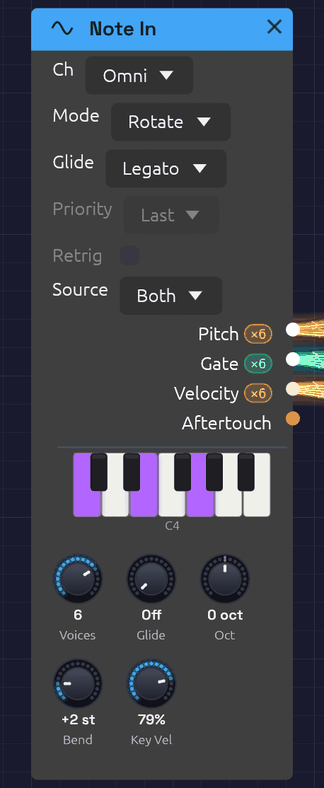 A chord from a MIDI keyboard and a note on the computer keys, lit on its piano.
Note In is how you play a patch. It takes notes from your computer keyboard, from the piano on its face (held with the mouse or a finger), and from a MIDI device: a keyboard, a pad controller, or a DAW or sequencer sending MIDI. It turns them into a V/Oct Pitch, a Gate, a Velocity and an Aftertouch signal that any module can use. It needs no setup and no hardware, which makes it the quickest way to hear a patch: the First Sound example that opens with the app is played from one.
With Voices at 1 it plays one note at a time, as a classic monosynth does: Priority decides which held key sounds. With more voices it plays chords. Every note you play gets a voice of its own, and the Pitch, Gate and Velocity cables carry all the voices at once, one channel per voice. Patch them into the polyphonic modules (Oscillator, SVF and Ladder filters, ADSR, VCA) and each held note plays through its own oscillator, filter and envelope. See Polyphony for how polyphonic cables work.
Every note, from the keys or from MIDI, starts on its exact sample, however short it is.
Outputs
| Port | Signal Type | Channels | Description |
|---|---|---|---|
| Pitch | Control (Orange) | One per voice | Each voice's note as V/Oct, with pitch bend. C4 (MIDI note 60) is 0.0 |
| Gate | Gate (Green) | One per voice | High while the voice's key, or the sustain pedal, holds its note |
| Velocity | Control (Orange) | One per voice | Each note's velocity, 0 to 1 |
| Aftertouch | Control (Orange) | 1 | Channel pressure, 0 to 1, shared by every voice |
Once the patch is playing, each polyphonic output shows its channel count in a small pill beside its label: ×8 means it carries eight voices. The Gate output lights up while a note is held.
Parameters
| Control | Range | Default | Description |
|---|---|---|---|
| Source | Both / Keys / MIDI | Both | Where the notes come from: the computer keys and the piano, a MIDI device, or both (see Sources) |
| Ch (Channel) | Omni / 1 – 16 | Omni | The MIDI channel to listen to. Omni hears all of them. The keys aren't on a channel, so this never turns them away |
| Voices | 1 – 8 | 8 | How many notes can sound at once, and so how many channels the cables carry. 1 plays one at a time |
| Mode (Allocation) | Rotate / Reuse | Rotate | With several voices, how a new note picks its voice (see Voice allocation) |
| Priority | Last / Low / High | Last | With one voice, which held key sounds (see One voice) |
| Retrig (Retrigger) | Off / On | Off | With one voice, restarts the gate when you move between held keys |
| Oct (Octave) | −4 to +4 | 0 | Shifts every note by whole octaves |
| Bend (Bend Range) | 0 – 12 semitones | 2 | How far the pitch bend wheel bends every voice |
| Glide | Off – 2 s | Off | How long the pitch takes to slide to a new note (see Glide) |
| Glide (Glide Mode) | Always / Legato | Legato | Which notes slide: all of them, or only those played while another key is held |
| Key Vel (Key Velocity) | 0 – 100% | 79% | How hard the computer keys and the piano play. A computer key can't tell soft from hard, so this sets it for all of them. 79% is MIDI velocity 100 |
Priority and Retrig only do anything with one voice, and Mode only with several, so the ones that don't apply are drawn faded. They can still be set, ready for when Voices changes.
Each voice runs a full copy of every polyphonic module downstream, so eight voices cost about eight times the CPU of one. If a patch is heavy, turn Voices down.
Sources
Both plays from everything: the computer keys, the piano on the face, and MIDI on the chosen Ch. Keys plays only from the computer keys and the piano, so a MIDI controller in the same patch can play something else. MIDI plays only from MIDI, so the computer keys can play something else. Two Note Ins, one on Keys and one on MIDI, give one patch a bass on the computer keys and a lead on a controller.
The piano on the face lights the notes held, from wherever they come.
Key layout
The bottom two letter rows form a piano keyboard starting at C4. The bottom row plays the white keys and the row above it plays the black keys, sitting between them as they would on a piano. The top letter row and the numbers above it are a second piano laid out the same way, an octave higher, as in a tracker:
Black keys:    2   3       5   6   7       9   0
White keys:  Q   W   E   R   T   Y   U   I   O   P
Note:        C5  D   E   F   G   A   B   C6  D   E

Black keys:    S   D       G   H   J       L   ;
White keys:  Z   X   C   V   B   N   M   ,   .   /
Note:        C4  D   E   F   G   A   B   C5  D   E
That's C4 to E6, a little over two octaves. The pianos overlap by a few notes: , . / play the same C, D and E as Q W E, so a run up the bottom row can carry on along the top. Turn Oct to move the whole range.
The piano on the face plays too. Hold a key with the mouse, or a finger on a touch screen, and it plays like a computer key; slide across the keys and the pitch follows. It's how Note In is played on a phone.
Keys don't play notes while you hold Ctrl or Alt (those are shortcuts), while you're typing in a text field, or while the quick-add palette is open. Space and Tab open the palette, so they're never notes. The app has to have keyboard focus: if nothing happens, click the canvas. Switching to another window lets go of every key held.
The keys play every Note In whose Source isn't MIDI, in the browser and inside a DAW as well as in the app, with or without a MIDI device. The MIDI Monitor shows them as Keys.
Choosing a MIDI device
MIDI comes in from the device chosen in MIDI In on the toolbar. The menu lists every MIDI input the system can see. Pick one and the dot beside its name fills in (●) once it's connected. None (Disconnect) lets go of it.
- Plugged in a device after starting Soba? Open the menu and click 🔄 Refresh.
- In the browser, the menu is a 🎹 Connect MIDI button until you allow MIDI, and a device plugged in later appears by itself. See MIDI.
- Connection failed? The reason appears in the status bar at the bottom of the window, and the selection goes back to None. On Windows, a device another app already has open (a DAW, a browser, a controller's editor) can't be opened a second time, so close the other app and pick the device again.
- Switching or disconnecting a device releases any notes still held on it, so nothing sticks.
- Inside a DAW, Soba plays the notes on its track, and there's no MIDI In menu.
The choice isn't saved with the patch or between sessions. One device feeds every Note In and MIDI Monitor module in the patch.
How notes become CV
- Note On raises the voice's gate and moves its Pitch to the note.
- Note Off drops the gate. Pitch stays on the note, so a release tail stays in tune.
- Pitch bend moves Pitch by up to ±Bend semitones. It glides over about 5 ms between the wheel's steps, so bends never zipper.
- Channel pressure appears on Aftertouch.
- The sustain pedal (CC 64) holds notes after their keys come up. Lifting it releases them all.
- All Notes Off (CC 123) and All Sound Off (CC 120) release everything, pedal or not.
Each semitone is 1/12 on Pitch, so MIDI note 72 (C5) is +1.0 and note 48 (C3) is −1.0. With every tune knob at 0, the Oscillator plays C4 at 0.0, so Note In plays it in tune with nothing to set.
Timing
Notes are handled on the audio thread. Each one is stamped the moment it arrives, from a device or from the keys, and placed at the matching sample of the next audio buffer. Every note is delayed by the same amount, one audio buffer (a few milliseconds), so a steady sequence from a DAW plays back steady, with no jitter. Even the shortest note produces a gate.
One voice
With Voices at 1, Note In plays legato. The first key raises the gate, and while any key is held the gate stays up: pressing another key moves Pitch to it without retriggering the envelope, so overlapping your key presses slurs one note into the next. When several keys are held, Priority picks the one that sounds:
| Priority | The key that sounds | Good for |
|---|---|---|
| Last | The most recently pressed | Most playing |
| Low | The lowest | Basslines: a held bass note wins over anything played above it |
| High | The highest | Leads over a held drone |
Release the sounding key and another held key takes over, so you can trill against a held note.
With Retrig off, playing legato changes the pitch but keeps the gate high, so the envelope carries on, for smooth, connected lines. With Retrig on, each legato note drops the gate for a single sample, so the envelope starts again on every note.
The cables carry one channel, so a monophonic patch hears one note.
Voice allocation
With several voices, Rotate gives each new note the next free voice in turn. A released note keeps ringing through its release while the next note sounds on a different voice, so release tails overlap naturally.
Reuse sends a note played again back to the voice that last played it, the way a piano string is struck again. Any other note takes the voice that has been free the longest, which gives release tails the most time to finish.
In either mode, a note played again while it's still sounding (held by the sustain pedal, say) restarts on its own voice rather than taking a second one.
Voice stealing
When every voice is busy, a new note takes one over. It chooses:
- a voice the sustain pedal is holding (its key already up), oldest first;
- otherwise, the oldest note still held.
The taken voice's gate drops for one sample, so its envelope starts again for the new note.
Glide
Glide makes the pitch slide from one note to the next instead of jumping, like the portamento on a classic monosynth. The knob sets how long the slide takes, from Off up to 2 seconds. Most of its travel covers the short times, where glide is most useful: 200 ms is a little past halfway.
- Even across the keyboard. The slide moves evenly in pitch, so it sounds the same low or high.
- The same time for any distance. An octave leap arrives as quickly as a step to the next semitone.
- Eases in. The pitch covers most of the distance early and settles gently onto the note: about two thirds of the way in the first fifth of the time, and within 1% of the note by the end of it.
The Glide dropdown picks which notes slide:
| Glide Mode | Which notes slide | Feels like |
|---|---|---|
| Legato | Only a note played while another key is still held. A note after a gap starts on its own pitch | A Minimoog or a 303: you choose each slide with your fingers |
| Always | Every note, from wherever the last one left off | Portamento that's always on |
Pitch bend rides on top of the glide: the wheel moves the pitch at once while the note underneath slides. With one voice, Glide and Retrig work together, so with both on, each legato note restarts the envelope and slides into pitch.
With several voices, each voice slides from its own previous note. Change chords with Glide up and every voice takes its own path, crossing and converging, the way the voices of a vintage polysynth do. A stolen voice slides from wherever it was. Mode decides where each slide starts: with Reuse, a note played again returns to the voice that last played it, so it doesn't slide at all; with Rotate, the voices take turns, so each slide starts from a different note of the last chord or two. In Legato mode a chord struck from nothing starts on its own pitches: notes arriving within 30 ms of the first count as part of that chord, since no hand strikes every key at once.
To hear it, open First Sound and turn Glide to about 200 ms. Hold Z (C) and tap B (G): the pitch slides up to G and, when you let go of B, back down to C.
MIDI Learn
Any knob in the patch can follow a MIDI controller (a mod wheel, a fader, a knob on your keyboard). This works with or without a Note In in the patch.
- Right-click the knob and choose Learn MIDI CC. A purple M badge blinks above it, and the status bar asks you to move a control.
- Move the knob or fader on your controller. The badge stops blinking: the knob is mapped.
Changed your mind, or no controller to hand? Press Escape, or right-click the blinking knob and choose Cancel MIDI Learn, and nothing is mapped. Starting learn on another knob moves it there instead.
The controller sweeps the knob's whole range, on any MIDI channel. Right-click a mapped knob to see its CC number, to Re-learn MIDI CC, or to Clear MIDI. Mappings are saved with the patch. Moves made by a controller aren't added to the undo history.
Patch examples
The smallest playable voice, as in the First Sound example, with Voices at 1:
[Note In Pitch] ──> [Oscillator V/Oct]
[Note In Gate] ──> [ADSR Gate]
[Oscillator Out] ──> [VCA In]
[ADSR Out] ──> [VCA CV]
[VCA Out] ──> [Audio Output Mono]
Chords, with Voices at 8:
[Note In Pitch] ──> [Oscillator V/Oct]
[Note In Gate] ──> [ADSR Gate]
[Note In Velocity] ──> [ADSR Velocity]
[Oscillator Out] ──> [Ladder Filter In]
[Ladder Filter LP24] ──> [VCA In]
[ADSR Out] ──> [VCA CV]
[VCA Out] ──> [Audio Output Mono]
Hold a chord and each note has its own oscillator, filter and envelope. The Audio Output is a mono module, so it hears the voices summed. Voices add up, so a four-note chord is about four times as loud as one note: leave headroom with the VCA's Level. The Lush Pad example is built this way.
Velocity on the ADSR Envelope makes harder notes louder. Patch Aftertouch into the filter's Cutoff to brighten a note as you press into the key.
Two voices on two channels, for a bass and a lead from one DAW:
[Note In (Ch 1, Voices 1, Priority Low)] ──> [Bass voice]
[Note In (Ch 2, Voices 1, Priority High)] ──> [Lead voice]
Older patches
Note In takes the place of three modules: Keyboard (the computer keys, one voice), MIDI Note (MIDI, one voice) and Poly MIDI (chords). A patch saved with any of them opens with Note In in their places, and plays as it did: a Keyboard becomes a Note In with one voice on Keys, at the Keyboard's velocity; a MIDI Note becomes one with one voice on MIDI; and a Poly MIDI is a Note In already.
Troubleshooting
No sound. Press Play: notes only sound while the patch is playing. Check Source. For MIDI, check that the device is selected in MIDI In and that its dot is filled, and set Ch to Omni in case the device sends on another channel. A MIDI Monitor shows whether anything is arriving at all.
Only one note of a chord sounds. Voices is at 1, or the cables run into a module that isn't polyphonic, which hears one channel.
Wrong pitch. Check Oct, and that the pitch bend wheel is centered.
Stuck note. Send All Notes Off from your controller, or select the device again in MIDI In. Either releases every held note.
Related modules
- MIDI Monitor – see the notes that are arriving
- Oscillator – where Pitch usually goes
- ADSR Envelope – where Gate and Velocity usually go
- Chord Sequencer – plays chords for you