3-Band EQ
Module ID fx.eq · Category Effect
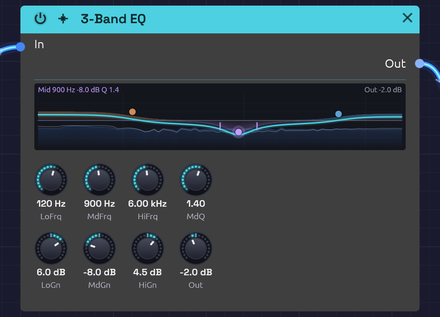 Pink noise through a warm low shelf, a cut in the middle and an airy top, with the pointer on the mid band
The 3-Band EQ boosts or cuts three regions of the spectrum: a low shelf for the bass, a fully parametric mid band, and a high shelf for the treble. Use it to fit a sound into a patch, take the mud out of a pad, put an edge on a lead, or darken a reverb tail.
Where a filter removes whole parts of the spectrum, an EQ leans on them, up to 15 dB either way. Every knob glides, so you can sweep the mid band while a note plays without zipper noise.
The display
The display draws the curve the three bands add up to, from 20 Hz on the left to 20 kHz on the right, and ±18 dB around the 0 dB line. Each band's own share is a faint tinted fill: the low shelf amber, the mid band violet and the high shelf blue. The bright line is their sum, with Out added. Every curve comes from the band's own filter, so it bends exactly as the sound does.
You can shape the EQ on the curve itself:
- Drag a dot to move its band: across for frequency, up and down for gain. The knobs follow.
- Drag a wing of the mid band (the short ticks either side of its dot, where its width ends) to set MdQ: out to widen it, in to narrow it.
- Double-click a dot to flatten its band back to 0 dB.
Pointing at a dot shows its band's settings at the top left. Out shows at the top right when it isn't 0 dB.
Beneath the curves is the sound itself: what comes into In is a faint blue landscape, and what leaves through Out is a pale line over it. A boost lifts the line above the landscape, and a cut carves a dip into it.
Inputs
| Port | Signal Type | Description |
|---|---|---|
| In | Audio (Blue) | Signal to equalize |
Outputs
| Port | Signal Type | Description |
|---|---|---|
| Out | Audio (Blue) | Equalized signal |
Parameters
| Knob | Range | Default | Description |
|---|---|---|---|
| LoFrq (Low Freq) | 20 Hz – 500 Hz | 100 Hz | Low shelf frequency |
| LoGn (Low Gain) | −15 dB – +15 dB | 0 dB | Boost or cut below the low shelf frequency |
| MdFrq (Mid Freq) | 100 Hz – 10 kHz | 1 kHz | Center of the mid band |
| MdGn (Mid Gain) | −15 dB – +15 dB | 0 dB | Boost or cut at the mid frequency |
| MdQ (Mid Q) | 0.1 – 10 | 1.0 | Width of the mid band. Higher is narrower |
| HiFrq (High Freq) | 2 kHz – 20 kHz | 8 kHz | High shelf frequency |
| HiGn (High Gain) | −15 dB – +15 dB | 0 dB | Boost or cut above the high shelf frequency |
| Out (Output) | −12 dB – +12 dB | 0 dB | Level after the EQ |
With every gain at 0 dB the EQ is transparent.
The bands
The three bands run in series: low shelf, then mid, then high shelf.
Low and high shelves
A shelf raises or lowers everything beyond its frequency by the same amount, like a bass or treble knob on a stereo. The LoFrq and HiFrq knobs set the shelf's midpoint: the frequency where it has reached half its gain. The shelves are as steep as they can be without overshooting, so a boost rises cleanly to its level with no bump at the corner.
The shelves have no Q of their own. To affect a narrower region at the bottom or top, use the mid band.
Mid band
The mid band is a bell-shaped peak or dip centered on MdFrq. MdQ sets its width:
- 0.1 to 1: broad and gentle, spanning several octaves. Good for tonal shaping.
- 1 to 4: focused but still musical.
- 4 to 10: narrow and surgical, for picking out a single resonance.
A good rule is to cut narrow and boost wide: narrow boosts sound unnatural, while narrow cuts can remove a problem without anyone hearing that it's gone.
Bypass
Click the power switch in the node header, press Ctrl+B with the module selected, or choose Bypass from its right-click menu. In passes straight to Out. The switch crossfades over 20 ms, so you can compare the EQ'd and original sound mid-note.
Finding a problem frequency
- Set MdQ high, around 5 to 8.
- Boost MdGn to +10 dB or so.
- Sweep MdFrq slowly until the ringing or boominess jumps out.
- Turn MdGn down below 0 dB to cut it.
Where things live
| Region | Frequency | Character |
|---|---|---|
| Sub | 20 – 60 Hz | Felt more than heard |
| Bass | 60 – 250 Hz | Weight, warmth, punch |
| Low mids | 250 – 500 Hz | Body; too much is muddy |
| Mids | 500 Hz – 2 kHz | Presence; too much is boxy or nasal |
| Upper mids | 2 – 5 kHz | Definition and attack; too much is harsh |
| Highs | 5 – 10 kHz | Brightness |
| Air | 10 – 20 kHz | Sparkle and openness |
Starting points
| Goal | Settings |
|---|---|
| Take out mud | MdFrq 300 Hz, MdGn −4 dB, MdQ 2 |
| Remove boxiness | MdFrq 500 Hz, MdGn −3 dB, MdQ 2.5 |
| Add warmth | LoFrq 100 Hz, LoGn +3 dB |
| Add presence | MdFrq 3 kHz, MdGn +3 dB, MdQ 0.8 |
| Add air | HiFrq 12 kHz, HiGn +3 dB |
| Thin, telephone-like | LoFrq 400 Hz, LoGn −15 dB; HiFrq 3 kHz, HiGn −15 dB; MdFrq 1.5 kHz, MdGn +6 dB |
Boosts raise the overall level. Pull Out down to match the bypassed level before deciding whether the EQ is helping.
Patch ideas
After distortion. Distortion's harshness usually sits in the upper mids. A broad mid cut around 3 kHz after it smooths the edge without dulling the sound the way a lowpass would:
[Distortion Out] ──> [EQ In] ──> [Audio Output Mono]
Darker reverb. The EQ is mono, so to shape a stereo reverb use one EQ per side, each cutting the lows (LoGn −6 dB) to keep the tail from clouding the bass.
Channel strip. EQ, then compress: the compressor then responds to the tone you chose rather than to the frequencies you were about to cut.
[VCA Out] ──> [EQ In]
[EQ Out] ──> [Compressor In]
Related modules
- SVF Filter: for removing whole ranges, or sweeping dramatically
- Compressor: often follows the EQ
- Distortion: creates harmonics worth shaping
- Reverb: an EQ after it shapes the tail