Audio Output
Module ID output.audio · Category Output
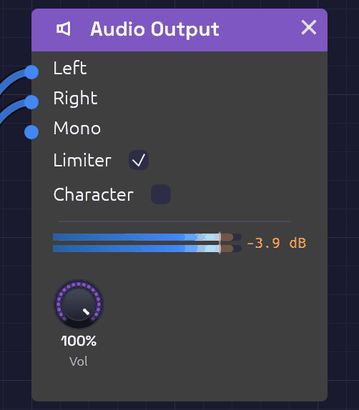 The meter shows what reaches your speakers, and in orange, what the limiter caught.
Audio Output is where a patch meets your speakers. Whatever arrives at its inputs goes through a short mastering chain (DC blocking, volume, optional saturation and a peak limiter) and on to your audio device.
Every patch that makes sound needs one. If a patch has more than one Audio Output, only one of them is heard, so route everything to a single output.
Inputs
| Port | Signal Type | Description |
|---|---|---|
| Left | Audio (Blue) | Left speaker |
| Right | Audio (Blue) | Right speaker |
| Mono | Audio (Blue) | Sent equally to both speakers. The easiest way to hear a patch |
The module has no outputs.
Parameters
| Control | Range | Default | Description |
|---|---|---|---|
| Vol (Volume) | 0 – 100% | 80% | Master volume |
| Limiter | On / Off | On | Catches peaks before they can clip |
| Character | On / Off | Off | Rounds off peaks above -3 dBFS, for a little warmth. See Character or Tape? |
Routing
Mono is added to both channels, on top of anything patched into Left and Right. Left and Right stay separate: a cable into Left alone plays only in the left speaker. For a mono source, use Mono. For stereo, patch a module's left and right outputs (an Oscillator's Out L and Out R, or any effect's Out L and Out R) into Left and Right.
The inputs are audio inputs, so a polyphonic cable is summed to one channel on the way in. A whole polyphonic voice can go straight to the output.
The output stage
The signal passes through these stages, in order:
- Mix. Left and Right, with Mono added to both. Any sample that isn't a valid number (NaN or infinity) is replaced by silence, so a misbehaving module can never send a burst of noise to your speakers.
- DC blocker. A 5 Hz high-pass removes any constant offset, such as a stray control signal or the lopsided output of an asymmetric distortion. It is far below anything you can hear.
- Volume.
- Character (when on). A soft clipper that leaves everything below about -3 dBFS untouched and rounds off peaks above it, never going past full scale. It adds a little warmth and density to loud material and none at all to quiet passages.
- Limiter (when on). A stereo-linked, look-ahead peak limiter with a ceiling of -0.3 dBFS. It sees each peak 1 ms before it arrives and turns the gain down just in time, so peaks are caught rather than clipped. It lets go quickly after a single transient and more slowly when it's working continuously, so it neither ducks audibly nor pumps. Linking the channels keeps the stereo image from shifting. The output never goes over the ceiling.
The limiter's look-ahead delays the output by 1 ms. The delay stays in place when the limiter is off, so switching it doesn't shift the timing.
Character or Tape?
Character and the Tape module both add warmth, but they do different jobs.
Character works only on the peaks. It has no memory and no tone of its own: below -3 dBFS it does nothing, and above that it rounds every sample off on the same curve, whatever its pitch. Quiet passages pass through unchanged, and loud ones gain a little density and reach the limiter a little softer. It needs no setting up, and on a patch that never gets loud it changes nothing.
Tape colours everything that passes through it, quiet or loud. You patch it in front of the output, and it has its own level calibration (0 VU is a sine at -18 dBFS RMS). The record head squashes the treble first, the head bump lifts the lows, the top end rolls off with speed and age, and wow, flutter and hiss make the sound move. Putting a patch on tape is a decision about how the whole patch sounds.
The two work together. Tape colours the mix, Character rounds whatever peaks still reach the output, and the limiter holds the ceiling. Clair de Satellite and From One Sine use the whole chain.
The meter
The node shows a stereo peak meter, one bar per channel, scaled from -48 to +6 dBFS.
- The bar is the level you hear, after the limiter. It runs blue through the body of the signal and warms to amber near full scale.
- A faint orange extension beyond the bar appears while the limiter is working. It reaches as far as the patch drove into it: the longer the extension, the harder the limiter is working.
- A thin tick marks the ceiling: -0.3 dBFS with the limiter on, 0 dBFS with it off.
- A peak-hold mark stays at the highest recent level for a moment and then falls.
- The readout to the right shows the limiter's gain reduction, such as -2.4 dB. It reads off when the limiter is switched off.
With the limiter off, anything over 0 dBFS shows in red. Those peaks will clip your audio device.
Hover the meter for exact levels: what's going out, what's going into the limiter, and how much it's reducing.
Setting levels
The limiter is a safety net, not a volume knob. A few decibels of reduction on the loudest peaks is inaudible. Constant reduction of 6 dB or more squashes the patch and dulls its transients. If the orange extension is always showing, turn something down earlier in the chain (the VCA's Level, the Mixer's levels, or an effect's output) rather than leaning on the limiter.
Remember that voices add up. A four-note polyphonic chord is about four times as loud as one note.
Turn Limiter off when you want to hear exactly what the patch produces, for example while checking how an effect behaves at full scale. Keep Vol low while you do.
Patches
Mono
[VCA Out] ──> [Audio Output Mono]
Stereo, through effects
[VCA Out] ──> [Delay In L]
[Delay Out L] ──> [Reverb In L]
[Delay Out R] ──> [Reverb In R]
[Reverb Out L] ──> [Audio Output Left]
[Reverb Out R] ──> [Audio Output Right]
The Delay plays a mono input on both sides when In R is empty, so a mono voice becomes stereo at the first effect.
Supersaw
[Oscillator Out L] ──> [Audio Output Left]
[Oscillator Out R] ──> [Audio Output Right]
With Voices above 1, the Oscillator spreads its unison voices across the two outputs.
Troubleshooting
No sound. Press Play in the toolbar. Check that something is patched into the output, that Vol is up, and that the meter moves. If the meter moves but you hear nothing, check your audio device and system volume.
Sound in one speaker only. A cable into Left or Right plays on that side alone. Move it to Mono, or patch the other side too.
Distortion. If the limiter's readout shows large, constant reduction, the patch is too hot. Bring levels down before the output. If Character is on, the soft clipper also colors peaks above -3 dBFS.