Attenuverter
Module ID util.attenuverter · Category Utility
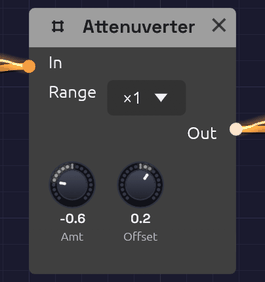 Amount scales and flips the input; Offset slides the result up or down.
An attenuverter turns a signal down, turns it upside down, or both. The name joins attenuate and invert. It also has an Offset knob that adds a fixed value afterwards. Between them, the two knobs adapt one module's output to what another module's input expects. Use it to tame an LFO that swings too wide, to make an envelope close a filter instead of opening it, or to turn a 0–1 signal into a -1–1 one. At Range ×4 it can also make a signal bigger, to sweep an input measured in octaves a long way.
With nothing patched into In, the output is just the Offset: a steady, hand-set control value you can patch anywhere.
The Attenuverter is polyphonic. Each channel of a polyphonic cable is scaled on its own, with the same knob settings.
Inputs
| Port | Signal Type | Description |
|---|---|---|
| In | Control (Orange) | The signal to scale, invert or shift. Audio patches in too |
Outputs
| Port | Signal Type | Description |
|---|---|---|
| Out | Control (Orange) | In × Amount + Offset, kept within -1 to +1 (-4 to +4 at Range ×4) |
Parameters
| Knob | Range | Default | Description |
|---|---|---|---|
| Amt (Amount) | -1 to +1 | +1 | Scales the input. Negative values flip it upside down |
| Offset | -1 to +1 | 0 | A constant added after scaling |
| Range | ×1, ×4 | ×1 | What Amount is multiplied by. At ×4, Amount reaches ±4 and the output may too |
How it works
Out = In × Amount × Range + Offset (limited to ±Range)
| Amount | Effect |
|---|---|
| +1 | The input passes unchanged (the default) |
| +0.5 | Half as strong |
| 0 | The input is gone; only Offset remains |
| -0.5 | Half as strong, upside down |
| -1 | Full strength, upside down |
At Range ×1 the output never goes past ±1. The Attenuverter can make a signal smaller or flip it, but it can't make it bigger. A sum that would exceed ±1 flattens at the limit, so if a large Offset clips the peaks of your signal, turn Amount down to make room.
Range ×4 multiplies Amount by four, so the knob's ends are ±4 and its middle still 0. The Amt knob reads the gain it gives: turned to the same place as 0.5, it reads 2.0. The output's limit widens to ±4 with it. Most inputs read only -1 to +1 and would clip anything bigger, so keep ×1 for them. ×4 is for inputs counted in octaves, where +1 is only a doubling: an ADSR's stage CV, a Clock's Tempo, a Slope's Rise and Fall. A filter's Cutoff counts in octaves too, but its own CV Amt already reaches ±4.
Patches saved before Range existed open at ×1 and sound as they did.
Both knobs are smoothed, so turning them doesn't step or click.
Patches
Reduce modulation depth
An LFO at full strength is too much for vibrato. Turn it down before it reaches the oscillator:
[LFO Out] ──> [Attenuverter In] ──> [Oscillator Exp FM]
               (Amt 0.2)
Invert an envelope
A negative Amount turns the envelope upside down, so the filter closes as the note starts and opens again as it releases:
[ADSR Out] ──> [Attenuverter In] ──> [SVF Filter Cutoff]
                (Amt -1)
The SVF's Cutoff input moves the cutoff in octaves around its knob, so set the Cutoff knob high and let the inverted envelope pull it down. (On a filter, a negative CV Amt does the same without an Attenuverter. This patch is for anything else an envelope should close.)
Unipolar to bipolar
An envelope runs from 0 to 1. With Amount 1 and Offset -0.5, it runs from -0.5 to +0.5, centered on zero. For the full -1 to +1 swing, it needs a gain of 2: Range ×4, Amount 2.0, Offset -1.
[ADSR Out] ──> [Attenuverter In] (Amt 1, Offset -0.5)
Bipolar to unipolar
A bipolar LFO swings from -1 to +1. Halve it and lift it by half to get 0 to 1:
[LFO Out] ──> [Attenuverter In] (Amt 0.5, Offset 0.5)
The LFO's own Bipolar switch does the same thing; this is for sources without one.
Sweep an octave input far
An LFO straight into an ADSR's Attack swings the attack only between half and double its knob. Scaled up four times, it swings four octaves each way: a 50 ms attack moves from about 3 ms to 0.8 s, so notes go from a snap to a slow swell and back.
[LFO Out] ──> [Attenuverter In] ──> [ADSR Attack]
               (Range ×4, Amt 4.0)
Turn Amount down for a narrower sweep. At 2.0, the attack moves two octaves each way, from a quarter of the knob's time to four times it.
A fixed control value
Leave In empty and use Offset as a knob you can patch. One Attenuverter can hold several destinations at the same value:
[Attenuverter Out] ──> [SVF Filter Resonance]
                   ──> [Ladder Filter Resonance]
Velocity to brightness, per voice
In a polyphonic patch, scale each voice's velocity before it moves the filter, so harder notes are brighter without the filter jumping a full octave. (The filter's own CV Amt at 0.5 does the same, if nothing else is patched into its Cutoff.)
[Note In Velocity] ──> [Attenuverter In] ──> [SVF Filter Cutoff]
                          (Amt 0.5)
Related modules
- VCA: scale a signal by another signal instead of by a knob
- Mix: add two signals together
- LFO and ADSR Envelope: the signals you'll most often scale