ADSR Envelope
Module ID mod.adsr · Category Modulation
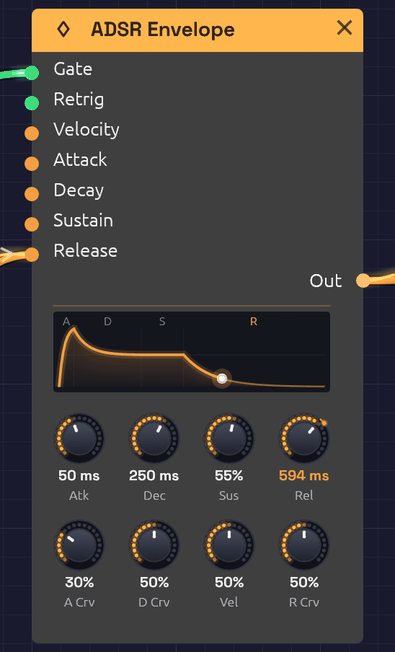 The display draws the same curve the audio follows. An LFO is patched into Release, so the R is lit and Rel reads the time it has stretched to.
The ADSR Envelope gives each note a shape in time. When a gate goes high (a key goes down), it rises, falls to a held level, and when the gate goes low (the key comes up), it fades away: Attack, Decay, Sustain, Release. Patch it into a VCA to shape a note's loudness, or into a filter's Cutoff to shape its brightness.
Every stage takes exactly the time on its knob: a 100 ms release is silent 100 ms after you let go. Each stage's curve knob sets its shape, from a straight line to a deep analog curve.
While a note plays, the display follows it: the stage it's in lights its letter, a dot rides the curve at the envelope's level, and the glow under the curve swells with it. A soft note's dot rides lower, at the peak its velocity gave it.
Inputs
| Port | Signal Type | Description |
|---|---|---|
| Gate | Gate (Green) | A rising edge starts the attack; a falling edge starts the release |
| Retrig | Gate (Green) | While the gate is held, a rising edge restarts the attack from the current level |
| Velocity | Control (Orange) | Note velocity (0.0 to 1.0), read at each note-on. Scales the peak; see Vel |
| Attack, Decay, Release | Control (Orange) | Stretch the stage's time around its knob, in octaves: +1 doubles it, −1 halves it. See Stage CV |
| Sustain | Control (Orange) | Added to the Sus knob's level |
Outputs
| Port | Signal Type | Description |
|---|---|---|
| Out | Control (Orange) | Envelope level, 0.0 to 1.0 |
Parameters
The knobs sit in two rows: the times and level on top, and under each time the curve of that stage.
| Knob | Range | Default | Description |
|---|---|---|---|
| Atk (Attack) | 1 ms – 10 s | 10 ms | Time to rise from the current level to the peak |
| Dec (Decay) | 1 ms – 10 s | 100 ms | Time to fall from the peak to the sustain level |
| Sus (Sustain) | 0 – 100% | 70% | Level held while the gate is high, as a fraction of the peak |
| Rel (Release) | 1 ms – 10 s | 300 ms | Time to fall from the current level to 0 after the gate goes low |
| A Crv (Attack Curve) | 0 – 100% | 20% | Attack shape: 0% is a straight ramp, higher bows it outward |
| D Crv (Decay Curve) | 0 – 100% | 50% | Decay shape: 0% is a straight ramp, higher drops fast then eases in |
| Vel (Velocity Amount) | 0 – 100% | 50% | How much the Velocity input scales the peak |
| R Crv (Release Curve) | 0 – 100% | 50% | Release shape: 0% is a straight ramp, higher drops fast then trails off |
The four stages
Attack begins when the gate goes high. The envelope rises from where it is (0, or wherever a release had got to) to its peak in exactly the attack time. A few milliseconds gives a percussive start; tens of milliseconds, the soft start of strings or a bowed pad; hundreds, a slow swell.
Decay begins the moment the attack reaches the peak. The envelope falls to the sustain level in exactly the decay time. Short decays are plucky; long ones ease gradually into the held note.
Sustain is a level, not a time: what the envelope holds for as long as the gate stays high. At 0% the note dies away even with the key held, like a plucked string. At 100% it holds at full level, like an organ. Turning it while a note is held glides to the new level over a few milliseconds, so it never clicks.
Release begins when the gate goes low. The envelope falls from wherever it is to 0 in exactly the release time, even if the key was let go mid-attack. Short releases stop abruptly; long ones leave a tail that lingers after the key comes up.
Curves
Each stage is an analog-style RC curve aimed past its target, so that it lands on time instead of creeping toward the target forever. The curve knob sets how far past:
- 0%: aimed far past, so the stage is a straight line.
- 20% (the attack default): aimed about 15% past the peak. The rise is nearly straight, which is what makes an analog attack sound punchy.
- 50% (the decay and release default): a classic RC fall. It drops quickly, then eases into its target, which suits how the ear hears loudness.
- 100%: a deep curve. Most of the change happens in the first fifth of the stage, followed by a long tail.
Curves change only the shape of a stage. Its time stays exactly the knob's.
Velocity
Patch a velocity source (the Velocity output of Note In) into Velocity, and the Vel knob sets how much it matters:
- Vel 0%: every note peaks at 1.0.
- Vel 50%: the softest note peaks at 0.5 and the hardest at 1.0.
- Vel 100%: the peak equals the velocity.
Sustain is a fraction of the peak, so a soft note sustains lower too. With velocity patched, the node's display draws a faint second envelope for the softest note. The gap between the two lines is your dynamic range.
With nothing patched into Velocity, every note peaks at 1.0, whatever the knob says.
Stage CV
Each stage has a jack beside its knob. CV there moves the stage around where the knob puts it, so the knob stays the starting point and the cable bends it:
- Attack, Decay and Release count in octaves of time. +1 doubles the knob's time, +2 quadruples it, and −1 halves it. A 500 ms release with +3 patched in rings for 4 s. The time stays within the knob's 1 ms – 10 s.
- Sustain adds to the knob's level, so +0.3 lifts a 40% sustain to 70%.
Most CV swings between −1 and +1, so an LFO patched straight into Attack only halves and doubles the attack. A 10 ms attack moves between 5 and 20 ms, which is hard to hear. To sweep it further, scale the LFO up first through an Attenuverter set to Range ×4. At ±4 octaves a 50 ms attack moves from about 3 ms to 0.8 s, from a snap to a swell.
The envelope reads CV on every sample, not just at each note. A cue that lands while a release is already falling stretches what's left of it, and the curve bends there without a step.
While a stage's jack is patched, its knob shows where the CV has taken it: an orange arc out to a bead on its rim, and the number under the knob in orange. The display draws that stage the way the envelope is running it, with its letter tinted. When a lane ramps the release out, you can watch the tail widen.
Patch examples
Volume envelope
[Note In Gate] ──> [ADSR Gate]
[ADSR Out] ──> [VCA CV]
[Oscillator Out] ──> [VCA In] ──> [Audio Output]
The basic shaped note. Without an envelope, an oscillator plays one endless tone.
Two envelopes: loudness and brightness
[Note In Gate] ──> [ADSR 1 Gate]
               ──> [ADSR 2 Gate]
[ADSR 1 Out] ──> [VCA CV]
[ADSR 2 Out] ──> [SVF Filter Cutoff]
Separate envelopes let the brightness move independently of the volume: a long release on ADSR 1 for sustained notes, and a short decay on ADSR 2 for a bright pluck at the start of each one.
Velocity to brightness
[Note In Velocity] ──> [ADSR 2 Velocity]
Add this to the two-envelope patch and harder notes come out brighter but no louder.
Inverted envelope
[ADSR Out] ──> [Attenuverter In]   (Amount -1)
[Attenuverter Out] ──> [SVF Filter Cutoff]
The filter closes as the note opens and opens again as it releases, for "backwards" sweeps. On a filter you can skip the Attenuverter: patch the envelope straight into Cutoff and turn the filter's CV Amt below zero.
Harder notes ring longer
[Note In Velocity] ──> [ADSR Velocity]
                   ──> [ADSR Decay]
A struck string rings longer when it's struck harder. With a short decay and no sustain, velocity into Decay gives a full-strength note twice the knob's decay and the softest one the knob's own. For a gentler spread, run velocity through an Attenuverter first. Pitch CV into Decay through an Attenuverter turned below zero makes high notes shorter, the way a piano's are.
Afterglow's arpeggio does this, with an Attenuverter's Offset at −0.5 so that only notes played harder than half ring longer. Its gate closes partway through the decay, so velocity goes to Release too.
A last chord that rings
[Arranger Lane 3] ──> [ADSR Release]
The plucks keep their short release all song. In the last section a lane rises from 0 to 1 or 2 and holds, and the final chord rings for a second or more instead of a few hundred milliseconds. Ramp the lane so the tails lengthen as the song slows.
Retriggering a held note
[Clock Gate] ──> [ADSR Retrig]
While the key is held, each clock pulse restarts the attack from the current level, re-articulating the note in rhythm.
Starting points
| Shape | Attack | Decay | Sustain | Release | Notes |
|---|---|---|---|---|---|
| Pluck | 1 ms | 200 ms | 0% | 100 ms | D Crv toward 80% for a sharper snap |
| Pad | 500 ms | 1 s | 70% | 2 s | A Crv near 0% for an even swell |
| Organ | 1 ms | 10 ms | 100% | 50 ms | |
| Brass | 100 ms | 300 ms | 80% | 200 ms | The attack is the breath |
| Percussion | 1 ms | 100 ms | 0% | 50 ms |
Polyphony
The ADSR Envelope is polyphonic. Patch a polyphonic gate (from Note In) into Gate and every voice gets its own envelope, with its own stage and level, so each note of a chord attacks and releases on its own. Polyphonic velocity into Decay gives each note its own decay; a mono cable, like an Arranger lane, moves every voice together. The display shows the first voice. See Polyphony.
Related modules
- VCA to shape loudness with the envelope
- SVF Filter and Ladder Filter to shape brightness
- Note In for gates and velocity
- LFO for modulation that repeats instead of following the note
- Slope for an envelope a trigger plays whole, however short the trigger