Clock
Module ID util.clock · Category Utility
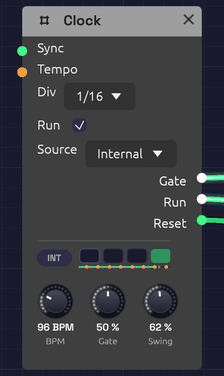 Four lamps count the beats of the bar, and INT says the Clock keeps its own time. The dots under the lamps are its sixteenths, swung at 62%: each orange one lands late. Jacks light while their gates are high.
The Clock is the patch's metronome. It sends a steady stream of gate pulses at a tempo you set, for stepping a Sequencer, firing envelopes on the beat, or triggering a Sample & Hold.
It also sets the patch tempo and beat. Tempo-synced modules follow it without a cable: the Delay with its Sync set to a note length, and the LFO with its Tempo set to a division. See Tempo and Sync.
The Clock can keep its own time, follow the MIDI clock of a DAW, drum machine or another synth, or join an Ableton Link session, so the patch plays in time with them.
The display
Four lamps show the beats of the bar. The lamp of the beat playing flashes as the beat lands and fades through it, and the downbeat flashes brightest. A thin line under the lamps sweeps across the bar, with a dot where each pulse falls. With Swing turned up, the late pulses are drawn in orange, pushed along towards the next one. When the Clock stops, the beat it stopped on keeps a faint outline.
Beside the lamps, a badge shows where the time comes from: INT for the Clock's own BPM, MIDI when it follows a MIDI clock, or LINK when it plays in a Link session. The MIDI badge fills in while clock ticks are coming in. The LINK badge fills in while anyone else is in the session, with a bubble on its corner counting them. Hover over the display to see what the Clock is doing.
Inputs
| Port | Signal Type | Description |
|---|---|---|
| Sync | Gate (Green) | A rising edge restarts the beat, so the next pulse starts right away |
| Tempo | Control (Orange) | The BPM knob's jack. Bends the tempo around the knob by octaves: +1 doubles it, −1 halves it. See Tempo CV |
Outputs
| Port | Signal Type | Description |
|---|---|---|
| Gate | Gate (Green) | One pulse per division. The jack lights while the gate is high |
| Run | Gate (Green) | High while the Clock runs. Patch it into a sequencer's Run so it stops when the Clock does |
| Reset | Gate (Green) | A 5 ms pulse when the Clock starts from the top: when Run is ticked, a MIDI Start arrives, or a Link session starts playing. Patch it into a sequencer's Reset |
Parameters
| Control | Range | Default | Description |
|---|---|---|---|
| BPM | 20 – 300 BPM | 120 | Tempo in beats (quarter notes) per minute. A cable in its jack bends it; see Tempo CV |
| Gate | 1 – 99% | 50% | How much of each pulse the gate stays high |
| Div | 1, 1/2, 1/4, 1/8, 1/16 | 1/4 | Dropdown on the node. Pulse rate relative to the beat |
| Run | On / Off | On | Checkbox on the node. Off holds the gate low and pauses the clock; on starts it from the top |
| Source | Internal / MIDI / Link | Internal | Dropdown on the node. Internal keeps time at BPM; MIDI follows the MIDI clock on the MIDI input; Link plays in an Ableton Link session (builds with Link only) |
| Swing | 50 – 75% | 50% | Delays every second pulse. 50% is straight; see Swing |
Divisions
BPM counts quarter notes, and Div sets how many pulses that makes:
| Div | One pulse every | At 120 BPM |
|---|---|---|
| 1 | 4 beats (a bar of 4/4) | 2 s |
| 1/2 | 2 beats | 1 s |
| 1/4 | Beat | 500 ms |
| 1/8 | Half beat | 250 ms |
| 1/16 | Quarter beat | 125 ms |
A Clock has one output. For a second rhythm, divide its pulses with a Clock Divider: a sixteenth Clock divided by 3 plays dotted eighths against it, and divided by 64 pulses once every four bars, slower than the Clock's slowest setting. The divider counts the Clock's own pulses, so the two can never drift apart, and changing the BPM moves both.
Gate length
Gate sets how long each pulse stays high, as a share of the time between pulses. At 50% the gate is high for half of each pulse. Short gates (5 to 20%) suit drums and plucks: the envelope gets its attack and goes straight to release. Long gates (80 to 99%) hold an envelope in its sustain, so notes run nearly into one another.
Swing
Straight pulses are metronomic. Swing makes them shuffle, the way drum machines do: the pulses come in pairs, and the second of each pair arrives late. The knob says where it lands, as a share of the pair.
| Swing | The second pulse lands | Feel |
|---|---|---|
| 50% | Halfway: straight | A grid |
| 54 – 60% | A little late | A pocket: the groove most hip-hop, house and funk sits in |
| 66.7% | Two thirds of the way | A triplet shuffle, as in a blues or a swing band |
| 75% | Three quarters of the way | A dotted shuffle, hard and bouncy |
At Div 1/16 the pairs are eighth notes, so the off-beat sixteenths swing; at 1/8 the pairs are beats, and the off-beat eighths swing. The first pulse of every pair stays on the grid, so the downbeats, the bar length, a sequencer's EOC and a synced Delay or LFO are exactly where they'd be without swing. Only the late pulses move.
Each late pulse's gate is shortened with its slot: Gate is a share of the time left before the next pulse, so even at 99% and 75% swing every pulse has its own edge. A Sequencer on a swung clock does the same with its notes, long on the beat and short off it.
Swing moves everything the Clock drives. To swing one part and not another, such as hats against a straight kick, give the swung part its own Clock at the same BPM, then press Stop and Play so both start from the top together. From then on they stay locked to the sample.
Tempo CV
The BPM knob has a jack. A CV there bends the tempo around the knob, by octaves: +1 doubles it, −1 halves it. Because the steps are octaves, an even ramp in the CV is an even change to the ear, the way a player slows.
| CV | Tempo |
|---|---|
| 0 | The knob's |
| −0.07 | 5% slower |
| −0.15 | 10% slower |
| −0.23 | 15% slower |
| −0.42 | Three quarters |
| −1 | Half |
| +1 | Double |
For any other change, the CV is log₂ of the new tempo over the old: log₂ 0.9 = −0.15 for 10% slower.
The knob still turns while a cable is in its jack, and it reads the tempo the Clock is actually playing. The tempo stays within the knob's 20 to 300 BPM.
Everything that keeps time by the Clock follows it. A sequencer's steps lengthen, and its gates with them, since a gate is a share of its step. An Arranger's sections stay in bars and only their seconds change. A Clock Divider counts the same pulses. The patch tempo bends too, so a synced Delay's echoes stretch and a synced LFO slows with the Clock.
The jack can take a cable from a module the Clock itself drives, such as an Arranger's lane. That cable closes a loop, so the Clock hears it one block late, a few milliseconds that a tempo never notices. While the Clock follows MIDI, Tempo CV does nothing: the master sets the tempo.
Sync and Run
A rising edge at Sync restarts the beat from the top. Use it to line the Clock up with another Clock, a sequencer's EOC, or any trigger. The Clock keeps its own tempo; Sync only moves where the beat falls. While the Clock follows MIDI, Sync does nothing: the MIDI clock places the beat.
Unticking Run holds the gate low and stops the clock where it is. Ticking it again starts from the top of the bar, the way a drum machine's Play button does, and fires Reset. Patch Run and Reset into a Sequencer and the sequence stops and starts with the Clock, always from step 1.
The Clock counts its beats with enough precision that even the slowest clock lands every pulse on its exact sample, however long it runs. Two Clocks at related tempos stay locked together.
The patch tempo
The Clock's BPM is the tempo for the whole patch, and its beat is the patch's beat. A Delay set to sync to 1/8 echoes on the eighth note of whatever the Clock is playing, and if you change the BPM the echoes move with it. An LFO synced to 1 bar sweeps once per bar, starting on the Clock's downbeat. Without a Clock in the patch, synced modules assume 120 BPM.
If a patch has more than one Clock, synced modules follow the first one in the patch's processing order (usually the one nothing else feeds), so give them all the same BPM.
Following MIDI clock
Set Source to MIDI to slave the Clock to a MIDI clock master, such as a DAW, a drum machine or a hardware sequencer. Choose the master's port in the MIDI device menu, and set the master to send MIDI clock to it. In most DAWs this is a Send MIDI Clock or Sync setting on the MIDI output.
- Tempo. The Clock measures the master's tempo from the spacing of its clock ticks (24 per beat), fitted over the last two beats so that MIDI timing jitter averages out. The BPM knob dims and reads the received tempo, and every synced module follows it. When the master changes tempo, the Clock catches up within two beats. Until ticks arrive, the knob reads No clock.
- Position. The Clock counts the ticks, so its beat is always exactly where the master's is, whatever the tempo. It can't drift.
- Start restarts from the top: the next tick is the downbeat. The Clock fires Reset, and Run goes high with the downbeat.
- Stop holds the Clock where it is, and drops Run and the gate.
- Continue plays on from where it stopped. If the master located first (a Song Position message, which DAWs send when you move the playhead), it plays on from there.
- Run still works as an on/off switch: the Clock runs only when it's ticked and the master is playing.
- Some clock sources send only ticks, never Start or Stop. The Clock runs on their ticks alone.
The Gate follows the master's beat too, so Div 1/16 pulses on every sixteenth of the DAW's grid. Patch Run and Reset into a sequencer to have it start, stop and restart with the DAW's transport.
Soba's own Play button still has to be on: while Soba is stopped, it doesn't listen.
Playing in a Link session
Ableton Link keeps apps on the same network in time with each other, with no cables and no master to set up: Live, Bitwig, Reason, Traktor, dozens of phone apps, and other copies of Soba. Set Source to Link and the Clock joins the session. Every app in it plays at one tempo, with its bars lined up.
- Tempo. The Clock plays at the session's tempo, and the BPM knob follows it: when another app changes the tempo, the knob turns to match. Turn the knob yourself and the whole session changes tempo with you. The Tempo jack does nothing while the Clock follows Link.
- Bars. The Clock's downbeats land on the session's: beat 1 of Soba's bar is beat 1 of Live's. Bars are four beats long.
- Start and stop. Link shares the transport too (Start Stop Sync, which other apps may have to switch on). Tick Run and every app in the session starts. With others in the session, the start waits for the next bar so it lands in phase. When another app starts or stops, the Clock does too, and its Run box follows. Starting fires Reset, so patched sequencers start from step 1 on the downbeat.
- Joining. A Clock that joins a session already playing takes the session's tempo and plays along. One that has the session to itself sets it from its own BPM and Run.
The badge reads LINK, and fills in with a count of the other apps while there are any. Soba joins the network only while a Clock follows Link, and leaves a second after the last one stops (or Soba is stopped).
Link is in the desktop app when it's built with Link: see Build with Ableton Link. The browser version can't join a session and doesn't offer it. A patch saved with Source on Link and opened in a build without Link keeps its own time at BPM.
Playing in a DAW
In the plugin, Source offers Host where the app offers Link. Set it and the Clock plays in the DAW's time:
- Tempo. The Clock plays at the DAW's tempo, tempo changes and all. The BPM knob shows it and can't be turned. The Tempo jack does nothing while the Clock follows the host.
- Beat. The Clock's beat is the DAW's: beat 1 of a Soba bar is beat 1 of the song's, wherever playback starts.
- Start and stop. The Clock runs while the DAW plays, if Run is on. Starting fires Reset, so patched sequencers start from step 1 as the song does.
The badge reads HOST, filled in while the DAW plays. A patch saved with Source on Host follows Link when it's opened in the app (or keeps its own time in a build without Link), and a Link patch opened in the plugin follows the DAW.
Patch examples
Stepping a sequencer
[Clock Gate] ──> [Sequencer Clock]
[Sequencer Pitch] ──> [Oscillator V/Oct]
[Sequencer Gate] ──> [ADSR Gate]
Set Div to 1/8 or 1/16 for a running bassline.
Notes on the beat
[Clock Gate] ──> [ADSR Gate]
[ADSR Out] ──> [VCA CV]
[Oscillator Out] ──> [VCA In] ──> [Audio Output]
A drone that sounds once per pulse. Lower the BPM to 40 to 60 and lengthen the envelope's release for slow, ambient swells.
A sequencer that starts and stops with the Clock
[Clock Gate]  ──> [Sequencer Clock]
[Clock Run]   ──> [Sequencer Run]
[Clock Reset] ──> [Sequencer Reset]
Untick and tick the Clock's Run, or press Stop and Play in your DAW with Source on MIDI, and the sequence starts again from step 1 on the downbeat.
A shuffled groove
Set Div to 1/16 and Swing to about 58% under a drum pattern. Every off-beat sixteenth lands a little late, and the hats stop sounding like a metronome. The Backbeat recipe has one to try it on.
Slowing into the last chord (rit.)
[Clock Gate]       ──> [Sequencer Clock]
[Clock Gate]       ──> [Arranger Clock]
[Arranger Lane 1]  ──> [Attenuverter In]   (Amount −0.23)
[Attenuverter Out] ──> [Clock Tempo]
Every pianist broadens into the last chord of a piece, and a sequenced patch can too. In the Arranger, set lane 1 to Jump to 0 at the start of the song, then to Ramp to 100% on Exp over the last two bars. The Attenuverter turns the lane into a slowing: at −0.23, the last bar ends 15% slower than it began, a gentle ritardando. At −0.42 it slows to three quarters, broad enough to hear as a gesture.
Exp holds the tempo nearly steady and then gives way into the end, as players do. Linear slows evenly, and Log slows at once and settles, more like a new, slower section (meno mosso) than an ending. Other moves on the same cable:
- A positive Amount turns the same ramp into an accelerando.
- A Jump changes tempo on a section's downbeat.
- Glide on the lane eases a Jump, so the change takes a beat or two.
Put the Arranger's last section after the ramp, with the final chord in it, and the chord lands at the slower tempo. From One Sine ends this way, broadening over its last four bars.
An LFO in time
Set the LFO's Tempo to a division, such as 1 bar. It needs no cable from the Clock: it sweeps once a bar, from the Clock's downbeat.
Echoes in time
[Clock] (BPM 100)
[Synth voice] ──> [Delay In L]   (Delay Sync: 1/8D)
The Delay needs no cable from the Clock to follow its tempo.
Notes
- The Clock is monophonic. It sends the same gate to every voice of a polyphonic module.
- The Clock runs with the transport. Stop halts it with the rest of the patch, and Play starts it again from the top of the beat.
- Following MIDI, the Clock ignores MIDI channels: clock messages have none. It ignores Tempo CV too.
- Clock ticks don't scroll through the MIDI Monitor, which would show little else. Start, Stop, Continue and Song Position do.
Related modules
- Sequencer, the Clock's most common partner
- Clock Divider to divide the Clock's pulses into longer phrases and odd rhythms
- ADSR Envelope to turn pulses into notes
- LFO, which locks to the Clock's beat when synced
- Delay, which follows the Clock's tempo when synced