LFO
Module ID mod.lfo · Category Modulation
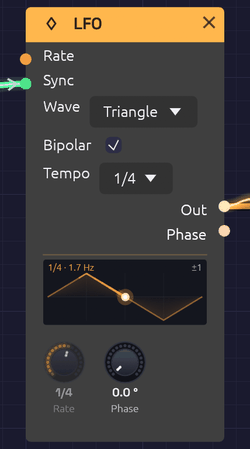 Synced to 1/4: the Rate knob reads the division, and the dot rides the waveform in step with the beat.
The LFO (low-frequency oscillator) makes slow, repeating shapes for moving other modules: a filter that breathes, a vibrato, a tremolo, a pulse width that drifts. It runs from one cycle every 100 seconds up to 100 Hz, so it can also be pushed into the audio range for rough, buzzy modulation.
The display on the node draws one cycle of the selected waveform, with a dot that travels along it at the LFO's actual phase, trailing a brighter stretch of the curve behind it. What you see is where the modulation is right now. Bipolar swings about a centre line; with Bipolar off, the wave stands on the floor, since it never goes below 0. A tick on the floor marks where the Phase knob starts the cycle. Across the top it reads the rate, after any Rate CV, or the division and the rate it comes to.
Inputs
| Port | Signal Type | Description |
|---|---|---|
| Rate | Control (Orange) | Rate CV, 1 per octave: +1 doubles the rate, -1 halves it |
| Sync | Gate (Green) | A rising edge restarts the cycle |
Outputs
| Port | Signal Type | Description |
|---|---|---|
| Out | Control (Orange) | The modulation signal: -1 to 1 when Bipolar is on, 0 to 1 when it's off |
| Phase | Control (Orange) | Position in the cycle, as a ramp from 0 to 1 |
Parameters
| Control | Range | Default | Description |
|---|---|---|---|
| Rate | 0.01 – 100 Hz | 1 Hz | Speed of the cycle. The knob is logarithmic |
| Phase | 0 – 360° | 0° | Shifts where in the cycle the waveform starts |
| Wave | Sine / Triangle / Square / Saw | Sine | Dropdown on the node |
| Bipolar | On / Off | On | Checkbox on the node. On swings -1 to 1; off stays between 0 and 1 |
| Tempo | Off, 4 bars – 1/32, dotted, triplet | Off | Dropdown on the node. Off runs free at Rate; a division locks the cycle to the Clock's beat |
Waveforms
- Sine moves smoothly with no corners. The natural choice for vibrato, tremolo and slow sweeps.
- Triangle rises and falls in straight lines. It sounds steadier than a sine at the turnarounds.
- Square jumps between its two extremes, half the cycle at each. Use it for trills, choppy tremolo and two-step filter jumps.
- Saw ramps steadily up, then drops back. A rising sweep that resets each cycle.
At the start of a cycle the sine and triangle sit at the midpoint, heading up, the square is high, and the saw is at its lowest.
Bipolar and unipolar
With Bipolar on (the default), Out swings evenly around zero. Into a filter's Cutoff or an oscillator's V/Oct, that sweeps both above and below the knob's setting, which is what you want for vibrato.
With Bipolar off, Out stays between 0 and 1: the same shape, lifted and halved. Use it where modulation should only add, as with a VCA's CV, where a bipolar LFO would spend half its cycle silent.
Tempo sync
Set Tempo to a division and the LFO locks to the patch's beat: one cycle per division, in step with the Clock. A 1 bar LFO sweeps once a bar; a 1/8 tremolo pulses on every eighth note. Change the Clock's tempo and the LFO follows, and if the Clock follows a MIDI clock, so does the LFO.
| Tempo | One cycle every | At 120 BPM |
|---|---|---|
| 4 bars, 2 bars, 1 bar | 16, 8 or 4 beats | 8 s, 4 s, 2 s |
| 1/2, 1/4, 1/8, 1/16, 1/32 | 2, 1, ½, ¼ or ⅛ of a beat | 1 s to 62.5 ms |
| D (dotted) | One and a half times the plain length | 1/4D = 750 ms |
| T (triplet) | Two thirds of the plain length, three in the time of two | 1/4T = 333 ms |
A synced LFO doesn't count its own cycles. It reads where the Clock's beat is, so it can't drift, however long it runs, and every synced LFO in the patch moves in step with the others. The cycles start on the Clock's downbeat: when the Clock starts from the top, so does the LFO.
While synced:
- The Rate knob dims and reads the division. Its pointer shows the rate that comes to at the current tempo.
- Rate CV has no effect.
- Sync still restarts the cycle, and the cycles then run from that moment, at the division's length, until the Clock starts from the top again.
- Phase still shifts the waveform, so a 1 bar LFO at 90° peaks on the downbeat.
- When the Clock stops, the LFO holds where it is, and carries on when the Clock does.
- Without a Clock in the patch, the LFO keeps its own time at 120 BPM.
Set Tempo back to Off and the LFO runs free at Rate, from the point it had reached.
Rate CV
The Rate input works in octaves, like V/Oct. +1 doubles the rate, +2 quadruples it, -1 halves it. The knob stays live while it's patched and sets the base rate the CV works from, so you can keep turning it.
[LFO 2 (slow)] ──Out──> [LFO 1 Rate]
A slow LFO into another's Rate makes modulation that speeds up and slows down on its own.
Sync and phase
Each rising edge at Sync restarts the cycle from the Phase setting. Patch a Clock into it and the LFO starts over on every pulse. To keep an LFO in time with the beat, though, Tempo is simpler and never drifts between pulses.
Phase shifts the starting point. Two LFOs at the same rate, one at 0° and one at 180°, move in opposite directions; at 90° they chase each other.
The Phase output is the LFO's position in its cycle, a 0-to-1 ramp whatever waveform is selected. Use it as an extra rising sawtooth, unipolar, alongside Out.
Patch examples
Vibrato
[LFO Out] ──> [Oscillator Exp FM]
Rate around 5 to 6 Hz, Sine, Bipolar on. Turn the oscillator's Exp FM knob down to about 0.02 octaves (Shift-drag for fine steps) for a gentle ±24 cents.
Tremolo
[Oscillator Out] ──> [VCA In]
[LFO Out] ──> [VCA CV]
Rate 4 to 8 Hz, Sine or Triangle, Bipolar off, so the level dips and returns rather than cutting out for half of each cycle.
Filter sweep
[LFO Out] ──> [SVF Filter Cutoff]
The Cutoff input works in octaves, so a bipolar LFO at full level sweeps the filter's CV Amt octaves either side of the knob: one, at first. A slow Triangle gives a smooth wah; a Square jumps between two brightnesses. Turn CV Amt down to sweep less, or up to sweep more.
A filter that breathes with the bar
[LFO Out] ──> [SVF Filter Cutoff]
Tempo 1 bar, Sine. The filter opens and closes once a bar, wherever the Clock's tempo goes. Try 2 bars for a slower swell, or a Square at 1/8 for a gated rhythm.
Pulse-width modulation
[LFO Out] ──> [Oscillator PWM]
With the oscillator on Square, a slow LFO (0.3 to 2 Hz) makes the tone shimmer and thicken like a chorus.
Stepped random
[LFO Out (fast Triangle)] ──> [Sample & Hold In]
[Clock Gate]              ──> [Sample & Hold Trig]
Each Clock pulse freezes wherever the LFO happens to be, and Sample & Hold holds that value until the next one. Set the LFO's rate so it isn't a simple multiple of the Clock's and the steps take a long time to repeat. (The trigger has to be a gate: an LFO can't patch into Trig.)
Notes
- The LFO is monophonic. One LFO patched into a polyphonic module moves every voice together. See Polyphony.
- The Rate and Phase knobs are smoothed, so turning them while the LFO runs doesn't click or jump.
- Run up into the audio range with Rate CV (it goes to 1 kHz), the LFO still sounds clean: the Square's and Saw's jumps, the Triangle's corners and each Sync restart are smoothed over a few samples, so they don't alias or click. At ordinary rates that touches only the samples right at each edge.
- Pressing Play starts every LFO from the beginning of its cycle.
- See Tempo and Sync for how the patch's tempo and beat reach the LFO.
Related modules
- ADSR Envelope for modulation that follows each note instead of repeating
- Clock, which sets the beat a synced LFO follows
- Attenuverter to scale, invert or offset the LFO
- Sample & Hold for stepped patterns
- Slope for a cycle with its rise and fall set apart, from a ramp through a triangle to a saw